Android
- Installation: APK sideload from tweedbet.app
- Minimum Android version: not publicly specified
- Google Play: not available
App at TweedBet in the UK: Play in Your Browser
The full TweedBet casino, live dealer tables, and sportsbook in the palm of your hand. Download the Android APK from tweedbet.app or add the iOS PWA to your Home Screen.
Device Compatibility
Android
iOS
The full TweedBet casino, live dealer tables, and sportsbook in the palm of your hand. Download the Android APK from tweedbet.app or add the iOS PWA to your Home Screen.
The full TweedBet casino, live dealer tables, and sportsbook in the palm of your hand. Download the Android APK from tweedbet.app or add the iOS PWA to your Home Screen.
Get the App 18+ only. Gambling may lead to addiction, play responsibly. Bonus T&Cs apply.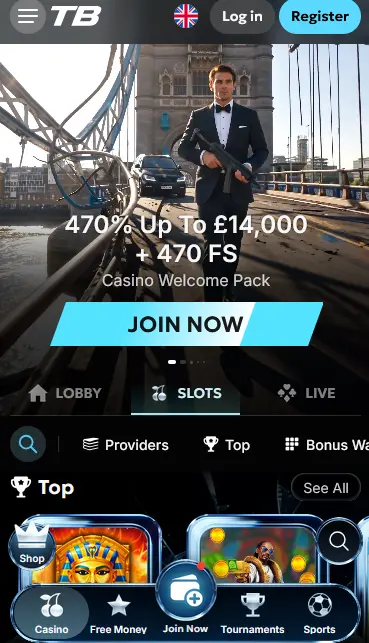
App Highlights
Full Game Catalogue
Every slot from Pragmatic Play, NetEnt, Hacksaw Gaming, and eight other providers is accessible in the app, alongside the complete live casino and sportsbook.
Instant Deposits
Visa and Mastercard debit card deposits process in seconds from the in-app cashier. Skrill, Neteller, and crypto are also available.
Biometric Login
Compatible Android and iOS devices can use fingerprint or face recognition to access your TweedBet account without entering a password each time.
How to Get the TweedBet App
TweedBet App: Key Points
Pros
Cons
Stay Secure on Mobile
What You Should Do
What You Should Avoid
Getting the TweedBet app onto your device takes a different path depending on whether you are on Android or iOS. Neither version is distributed through the Google Play Store or the Apple App Store, so the process differs slightly from installing a mainstream application. Both methods are straightforward and take only a few minutes.
Android devices block the installation of apps from outside the Play Store by default, so the first step is to allow your browser to install unknown-source apps. This is a one-time setting. Open your device Settings, navigate to Security or Privacy (the exact menu name varies by manufacturer), and enable the relevant permission for your browser app. Then visit tweedbet.app, locate the Android APK download link, and tap it. The file downloads to your device; tap it in the notification bar and follow the installation prompts. The TweedBet icon appears on your Home Screen once installation is complete. For security, it is good practice to disable the unknown-sources permission again after installation.
Apple does not allow casino apps in the App Store for most jurisdictions, so TweedBet provides a Progressive Web App (PWA) instead. Open Safari on your iPhone or iPad (other iOS browsers do not support the Add to Home Screen feature in the same way) and navigate to tweedbet.app. Tap the Share icon at the bottom of the screen, then select Add to Home Screen from the list of options, and tap Add. The TweedBet icon now appears on your Home Screen. Opening it launches the site in full-screen mode without the Safari address bar, providing an experience very close to a native app.
If you prefer not to install anything, the mobile browser version of tweedbet.app is a fully functional alternative. All games, the live casino, the sportsbook, and the cashier load normally in Chrome, Firefox, or Safari on both Android and iOS without any installation at all.
Every title available on the desktop site is accessible in the TweedBet app, with no separate mobile-only catalogue.
The full selection of video slots, Megaways slots, bonus-buy slots, and crash games is available, spanning eleven providers. On mobile, touch controls replace mouse clicks on the spin button and bet controls. Gates of Olympus (Pragmatic Play, RTP 96.5%), Dead or Alive 2 (NetEnt, RTP 96.8%), and Aviator (Spribe, RTP 97%) are among the most-played titles in the mobile environment due to their fast-loading lightweight graphics.
Evolution Gaming and Pragmatic Live tables stream in real time within the app. Lightning Roulette, Crazy Time, Infinite Blackjack, Speed Baccarat, and the full catalogue of live dealer games load via adaptive streaming that adjusts video quality to available bandwidth. A stable Wi-Fi or 4G/5G connection is recommended for the best experience.
RNG-based blackjack, roulette, and baccarat are available in the app with the same certified random number generators as the desktop versions. These titles load faster than live streams and are a good option on variable mobile connections.
Progressive jackpot slots including Mega Moolah (Microgaming) and Divine Fortune (NetEnt) are playable in the app. The jackpot meter displayed in the slot reflects the same live prize pool as the desktop version.
TweedBet’s Android APK and iOS PWA are designed to run on the major modern versions of each operating system. Neither version requires a specific minimum OS version to be publicly stated, but running the most recent version of Android or iOS available for your device is always recommended for security and performance.
| Platform | App Type | Distribution | Min OS |
|---|---|---|---|
| Android | Native APK | tweedbet.app direct download | Not specified |
| iOS | PWA | Safari Add to Home Screen | Not specified |
The in-app cashier is identical in functionality to the desktop cashier.
Visa and Mastercard debit cards, Skrill, Neteller, bank transfer, Bitcoin, Ethereum, and Litecoin are all available from the cashier within the app. There is no restriction on which payment method can be used on mobile versus desktop.
| Method | Deposit | Withdrawal |
|---|---|---|
| Visa / Mastercard | Instant | 1-5 business days |
| Skrill | Instant | Up to 24 hours |
| Neteller | Instant | Up to 24 hours |
| Bitcoin | After blockchain confirmation | Up to 24 hours |
| Ethereum | After blockchain confirmation | Up to 24 hours |
| Litecoin | After blockchain confirmation | Up to 24 hours |
| Bank Transfer | 1-3 business days | 3-7 business days |
All payment data entered in the app is transmitted over an SSL-encrypted connection. Card details are processed by the card scheme’s own secure infrastructure and are not stored on TweedBet’s servers. Cryptocurrency transactions are processed on their respective blockchains with standard confirmation requirements.
TweedBet’s mobile apps apply the same security standards as the desktop site, with additional mobile-specific protections available.
All data transmitted between your device and TweedBet’s servers is encrypted using industry-standard SSL/TLS protocols. This applies to login credentials, personal data, and all financial transactions within the app.
Two-factor authentication can be enabled from the Security section of your account settings. Once active, every new login attempt on the app requires both your password and a time-based one-time password (TOTP) generated by your authenticator app. This prevents unauthorised access even if your password is compromised.
On devices with a fingerprint sensor or facial recognition (Face ID on iPhone, fingerprint on most Android handsets), biometric login can replace the password step after the first successful password login. This is enabled within the app’s settings menu.
If you do not yet have a TweedBet account, you can register directly from the app or PWA. Tap the Register or Sign Up button, complete the form with your email address, a secure password, and your personal details (name, date of birth, address), confirm you are 18 or over, and accept the terms and conditions. A verification link is sent to your email address; click it to activate your account. You can then log in and make a first deposit to claim the welcome bonus.
Enter your registered email address and password on the app’s login screen. If 2FA is active, enter the authenticator code when prompted. Once inside your account, all games, the cashier, promotions, and the sportsbook are accessible from the bottom navigation or the main menu.
All TweedBet bonuses are fully accessible from the app. New players who register and make their first deposit through the mobile app qualify for exactly the same welcome offers as desktop players.
The Casino Welcome Pack (70% up to EUR 14,000 plus 470 free spins), the Casino 1st Welcome (100% up to EUR 1,000 plus 100 free spins), the Crypto Welcome Bonus (110% up to EUR 1,300 USDT plus 110 free spins), and the VIP Welcome Pack (770% up to EUR 13,000) are all available regardless of whether you register on desktop or via the app. Select your preferred offer in the promotions section before completing your first deposit. Full terms and wagering conditions for each offer are detailed on the bonus page. 18+ only, T&Cs apply.
Help is available directly from the app without needing to switch to a desktop browser.
The live chat widget is accessible from within the TweedBet app at any time. Tap the chat icon, type your question, and an agent will respond in real time. For matters that require document uploads or written records, email [email protected] directly from your phone. The support team operates 24/7, covering all UK time zones throughout GMT and BST.
Deposit limits, session time reminders, and self-exclusion tools are accessible from the Account Settings section of the app. Setting a deposit limit before starting play is the most effective way to stay within your intended spending. If you have concerns about your gambling behaviour, contact [email protected] or speak to an appropriate independent support organisation. All products on TweedBet are for players aged 18 and over.
App Questions Answered
Offshore-licensed casinos are generally not listed on Google Play or the App Store. TweedBet distributes its Android app as a direct APK download from tweedbet.app and offers an iOS PWA that installs from Safari without needing the App Store.
The APK is provided directly by TweedBet from its official domain. Downloading it only from tweedbet.app and not from any third-party site is the safest approach. Ensure your device's security settings are returned to their default after installation.
Yes. The PWA runs in Safari's full-screen mode and streams Evolution Gaming and Pragmatic Live tables in the same way as the desktop site, provided you have a stable Wi-Fi or 4G/5G connection.
The iOS PWA updates automatically each time you open it, as it loads the latest version of the site from tweedbet.app. For Android, check the tweedbet.app site periodically for a new APK version and install it over the existing one.
Download TweedBet and Start Playing
Grab 70% up to EUR 14,000 and 470 free spins.
Join TweedBet 18+ only. Gambling may lead to addiction, play responsibly. Bonus T&Cs apply.